How to pay with USDT on TRON (TRC20)
Step by step
- Open your wallet or exchange (e.g. Trust Wallet, TronLink, Binance, Bybit, OKX, Kraken) and choose Send / Withdraw USDT.
- Network: choose TRON (TRC20). Not ERC20, not BEP20, not Solana – USDT sent on another network will be lost.
- Paste the address or scan the QR code below, then compare the first and last 4 characters: TJCB…ZL3G.
- Enter the exact amount shown for your order – the cents identify your order. If your exchange deducts a withdrawal fee, make sure the full amount arrives.
- Send, then reply to your order email with the transaction ID (TXID).
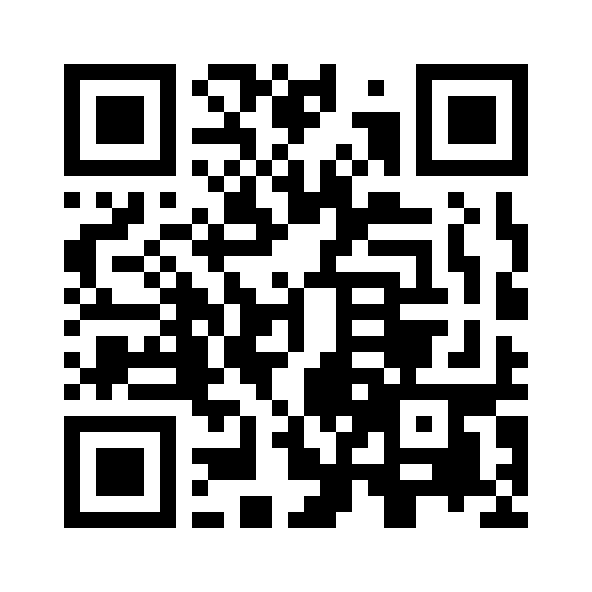
TJCBssZ1KdwLj5dS6hDUK4SprWwqvLZL3GUSDT on TRON (TRC20) only
How we verify
We check every payment on the TRON blockchain: the token must be genuine Tether USDT (contract TR7NHqjeKQxGTCi8q8ZY4pL8otSzgjLj6t), the status must be confirmed, and the amount and receiving address must match. Screenshots are not accepted as proof.
Prefer PayPal?
Send to mosh5566@gmail.com as "Goods and Services" and write your order number in the note.
Safety
- We will never ask for your seed phrase, private key or a "test" payment.
- The only address we use is the one above. If anyone sends you a different address, it is not us.
- Always copy the address from this page, never from your wallet history (look-alike addresses are a common scam).